On-device AI · Explains itself · Zero telemetry

Your inbox, already handled — before you open it.

Mailie Pro runs a real language model on your phone. It reads the overnight mail, tells you what needs you and why, answers questions about your own inbox with citations, and drafts replies in your voice — without sending a single word to anyone’s server.

  • A real on-device LLM
  • Explains its own priorities
  • Zero telemetry
  • OpenPGP & S/MIME
  • Works without Google services
The Mailie Pro daily briefing: an executive overview, a seven-day deadline rail, and conversations triaged into lanes
TLS 1.3JMAPIMAPPOP3 OpenPGPS/MIMEDNS-over-HTTPSTor-readyUnifiedPush
0
Trackers, telemetry & ad IDs
100%
AI runs on your device
3
Protocols: JMAP · IMAP · POP3
10
Languages, RTL included
The intelligence

A real AI engine. On your phone. Never in the cloud.

The mainstream clients ship your inbox to a data centre to make it “smart”, then charge a subscription for the good parts. Mailie Pro runs a genuine language model on the device in your hand — included, private, and yours.

A language model in your pocket

A real instruction-tuned LLM runs in-process — Qwen3 or Gemma, your pick, or Gemini Nano. Import any compatible model. No Play services, no account, no cloud. GPU acceleration engages itself where your phone supports it.

Learns how you work

Recategorise a message, send a reply, swipe away a newsletter — Mailie Pro quietly learns your labels, your people and your writing voice, so it fits you better every week. Every bit of it stays encrypted on the device.

Understands what you mean

A multilingual index turns your mail into on-device understanding, so search, find-similar and ask-your-inbox work by meaning rather than keywords — across 100+ languages, Arabic included.

Every model, every vector, and everything it learns stays encrypted on your device. There is no server to send it to.

What sets it apart

Everything an inbox should be — and nothing it shouldn’t.

A focused look at what you’ll reach for every day. Every image below is the real app. The full catalogue lives on the features page.

01 The briefing

Open your inbox to a briefing, not a backlog.

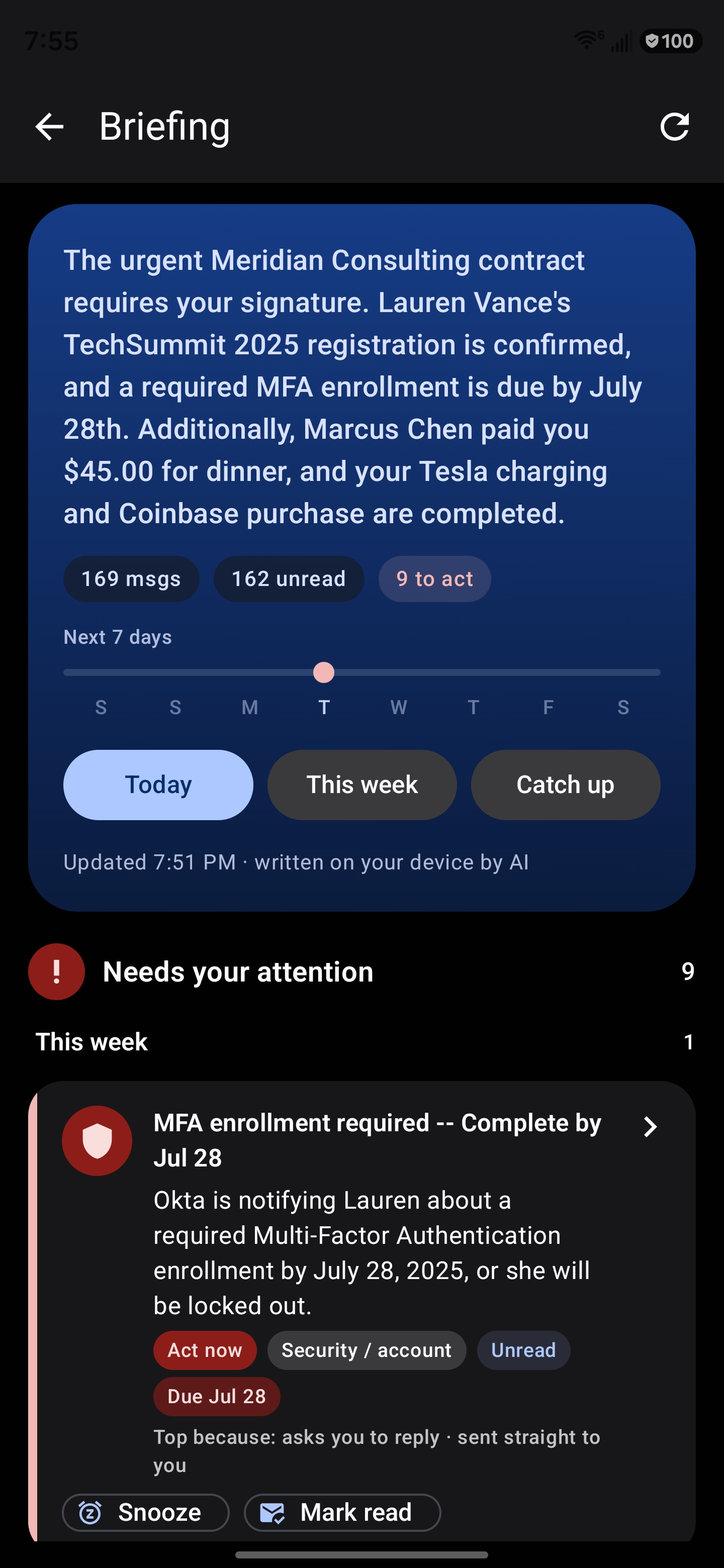
Before your first coffee, Mailie Pro has read the overnight mail and written you a private executive briefing — a clear overview on top, then every conversation triaged into what needs you, what you promised, what you’re waiting on and what’s merely FYI. The attention lane is ordered by when things are actually due, and a seven-day rail shows what’s coming.

  • One synthesised sentence first, then the whole inbox in lanes
  • Grouped by deadline — overdue, today, this week — not just by rank
  • One-tap actions: add to calendar, track a package, call, snooze
  • Composed and fact-checked on your phone, never sent to a server
Learn more
The Mailie Pro briefing: an executive overview, a seven-day deadline rail, and a card in the “Needs your attention” lane showing why it ranked first
02 Reasoning you can see

It tells you why something is at the top.

Most “smart” inboxes reorder your mail and ask you to trust them. Mailie Pro shows its working: each card can say what pushed it up — “asks you to reply · sent straight to you · due Thursday”. Those reasons are read out of the ranking arithmetic itself, so the explanation can never drift away from the decision it describes.

  • Every priority is attributable to something in the real message
  • Tap any line to open the mail it came from
  • Correct a category once and it stays corrected — permanently
  • Nothing is inferred that the app cannot point at
Learn more
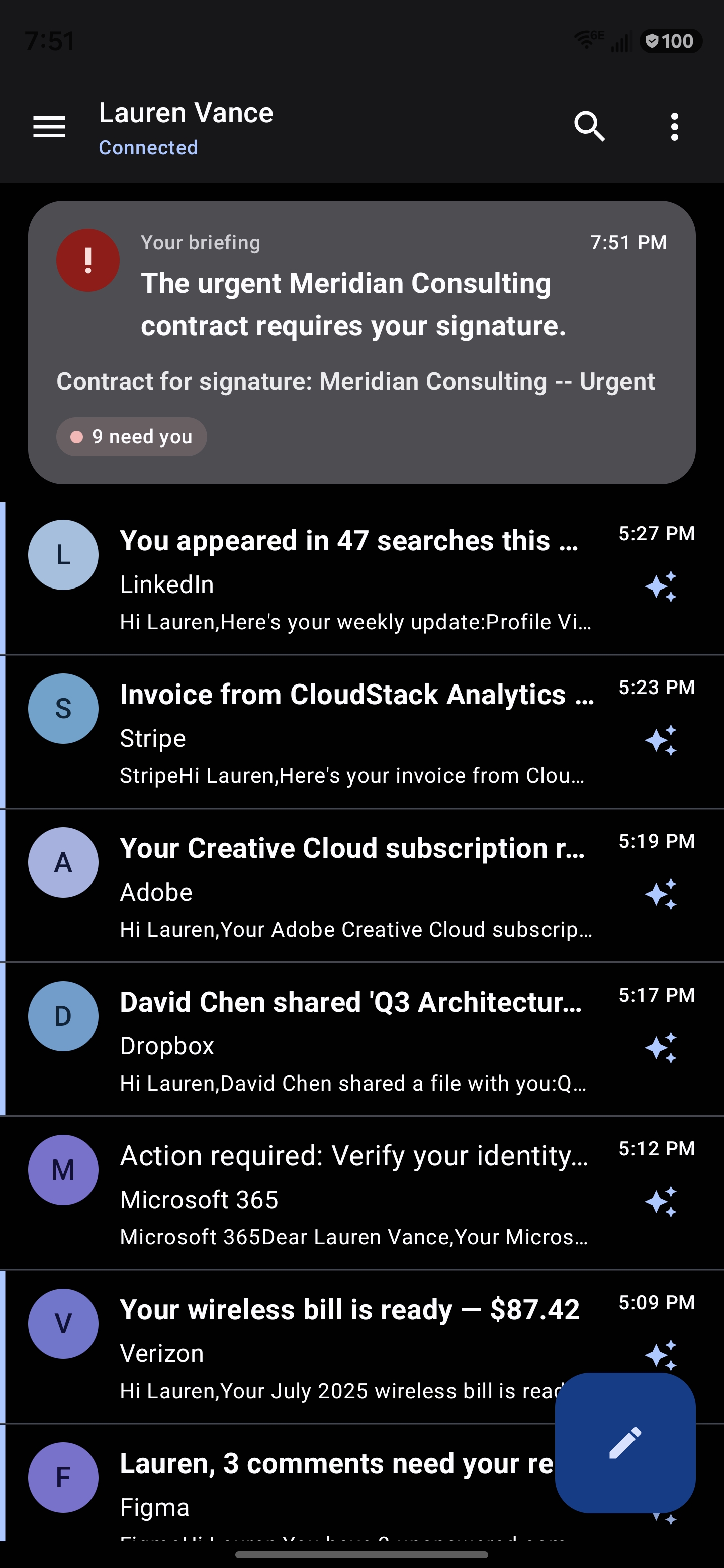
The Mailie Pro unified inbox with the briefing card at the top, showing the top item and a “9 need you” count
03 Ask your inbox

Ask a question. Get an answer you can check.

Type a question the way you’d say it — “any bills due?”, “where are my packages?”, “what did the lawyer ask for?” — and Mailie Pro retrieves the relevant messages and answers from them, with a numbered source on every line so you can tap straight to the email. Follow-up questions know what you were just talking about. All of it runs on your device.

  • Answers drawn only from your real mail, never from the model’s imagination
  • A citation on every line — verify it in one tap
  • Suggested questions adapt to what’s actually in your inbox
  • 100% on-device retrieval; your mailbox is never uploaded
Learn more
The Mailie Pro “Ask your inbox” screen with suggested questions such as “Any bills due?” and “Where are my packages?”
04 Summaries where you already are

Understand a message without opening it.

Tap the spark beside any row and a summary streams in right there in the list — the gist, the numbers that matter, and what it wants from you. Every figure in it has to appear literally in the original, and the whole summary is checked for staying on topic before you ever see it.

  • Streams in live, word by word, from a model on the phone
  • Facts are verified against the source; unverifiable text is dropped
  • Pre-computed while charging, so the common case is instant
  • Says plainly that AI output is a draft to check, not advice to act on
Learn more
A summary bubble open over the Mailie Pro inbox, breaking a wireless bill into its line items with an “Action needed” line
05 Caught before you act

It notices the message that isn’t what it claims.

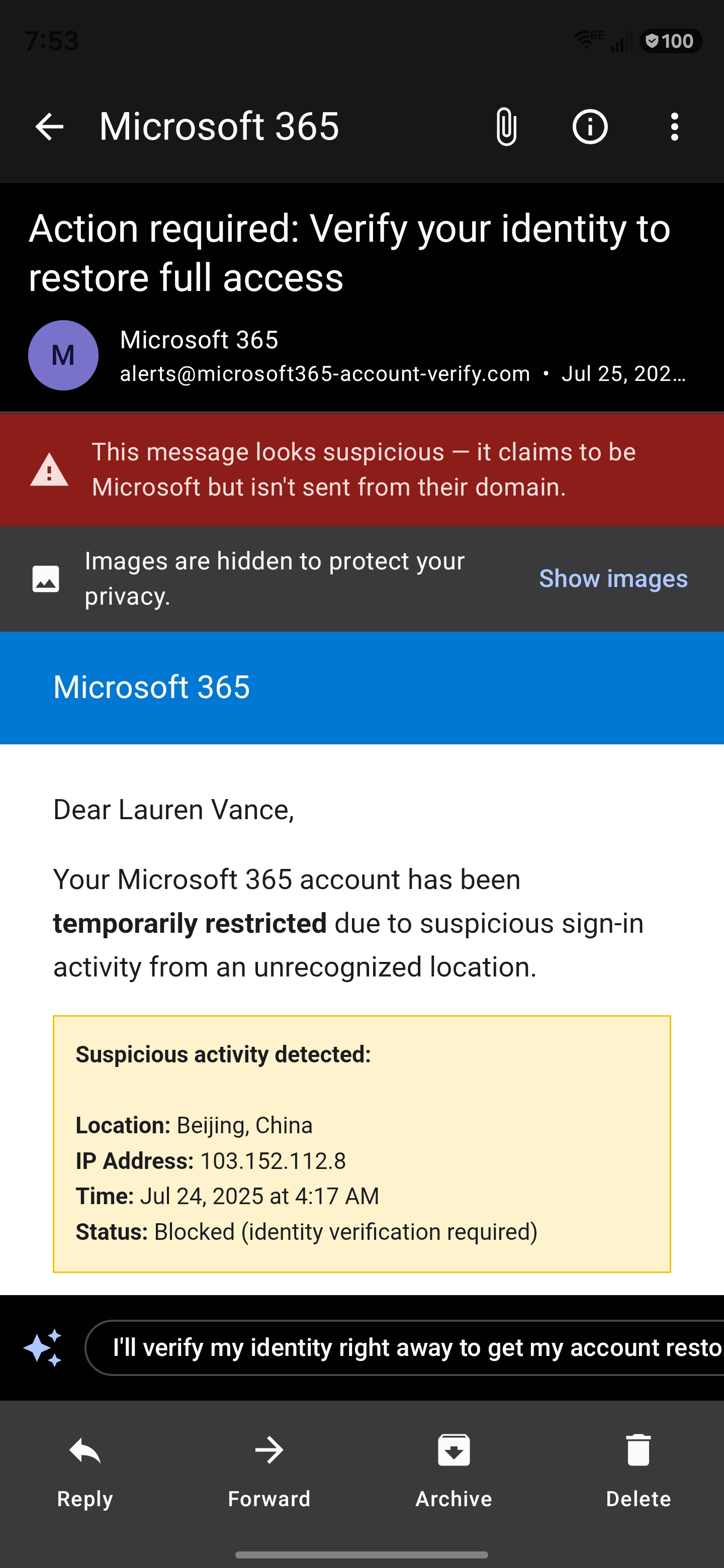
On-device heuristics read the sender, the domain and the language — in every one of the ten languages the app ships in — and say plainly when something claims to be one company but was sent from somewhere else. Trackers are blocked before they fire, mail can be sealed with OpenPGP or S/MIME, and a certificate that changes stops the connection instead of quietly continuing.

  • Phishing and scam warnings that name what they actually saw
  • Remote images blocked by default — the sender never learns you looked
  • A warning when a known contact’s mail stops resembling them
  • TLS 1.3 with pinning, encrypted DNS, optional Tor routing
Learn more
Mailie Pro flagging a message: “This message looks suspicious — it claims to be Microsoft but isn’t sent from their domain”, with images hidden
06 Writing, and a second pair of eyes

Draft in your voice — and catch the mistake before it sends.

Write a whole email from a one-line brief, or rewrite what you have. Suggestions learn from the mail you’ve actually sent, so they sound like you. Dictate, handwrite, or scan a document straight into the message. And in the moment before it leaves, Mailie Pro quietly checks the things people actually get wrong.

  • You mentioned an attachment and didn’t add one
  • Exactly one recipient is outside everyone else’s domain
  • Compose, rewrite, dictate, handwrite or scan — all on-device
  • Advisory only: it asks once, and “send anyway” is always there
Learn more
The Mailie Pro composer with Compose with AI and Rewrite buttons, handwriting and dictation icons in the body field, and a Scan document button
A professional working with Mailie Pro
A professional working at a café with Mailie Pro open on her phone beside a laptop
Built for how you work

Less time in your inbox. More time on what matters.

Mailie Pro is made for people who run their day out of email — founders, operators, professionals. It reads, triages, explains and drafts, so you act on what counts and let the rest fall into place. On a tablet or an unfolded foldable it becomes a three-pane workspace that opens on your briefing.

Explore every feature
The everyday details

And the things that make a day run smoothly.

Thoughtful touches you’ll reach for constantly — each one on-device and private, like the rest of the app.

The file drawerNew

Every attachment you have ever received, as searchable files — save, scan or read text from one without hunting for the email.

PeopleNew

One page per person: everything they have sent you, whether you hold a key for them, and one-tap unsubscribe or block.

Snooze until they replyNew

Not a timer — the message comes back when the conversation actually moves.

Promises you madeNew

Surfaces what you said you’d do, quoted from your own sent mail, once it goes quiet past its date.

While you were awayNew

A briefing bounded by when you last looked, not by the calendar — so a week off doesn’t vanish.

Contacts & CardDAVNew

A real address book in the encrypted database, with vCard import and optional sync to your own server.

Search that admits its limitsNew

Fast full-text search that tells you when there were more results than it showed.

Smart Views

Your whole inbox auto-sorted into categories you can clear one at a time.

Smart filters & mute

Turn one message into a rule that works by meaning — with a preview of what it would catch.

Priority topic alerts

Name a topic in any language and get alerted when mail about it arrives.

Calendar invites & RSVP

Accept, decline, or add to your calendar right from the message.

One-click unsubscribe

Leave a mailing list in a single tap — in-app, no browser detour.

Masked email aliases

Generate burner addresses via SimpleLogin or addy.io to protect your real one.

Tablets & foldablesNew

A navigation rail, your list and a detail pane that rests on the briefing.

Read aloud & voice

Listen to mail and dictate replies — on-device, opt-in, alongside full screen-reader support.

Home-screen widget

Your latest briefing and unread count, always a glance away.

See every feature in detail

How it compares

The mainstream clients moved their intelligence to the cloud.

Mailie Pro keeps it — and your mail — on your phone. Here’s an honest, current comparison of the Android apps, including the rows where the others win.

Mailie Pro compared with the Gmail, Outlook, Proton Mail and Thunderbird Android apps, as of July 2026. Each row states whether a capability is present, partial or absent.
Capability Mailie Pro on-device · private Gmail Android appOutlook Android appProton Mail Android appThunderbird Android app
On-device intelligence
AI runs on your deviceyour mail is never sent to a server to be read Yes — a real in-process LLM No — cloud (Gemini 3) No — cloud (Copilot) Partial — Scribe — web/desktop only No — no AI features
AI included in the priceno separate subscription to unlock it Yes — one-time purchase Partial — summaries free · AI Inbox paid No — needs Copilot licence No — paid Mail plans n/a
AI briefing & inbox triage Yes — daily · weekly · catch-up Partial — AI Inbox — AI Plus/Pro/Ultra Partial — Copilot — paid No No
Explains why something ranked first Yes — derived from the ranking itself No No No No
Ask your inbox, with citationsanswers link to the messages they came from Yes — on-device, source per line Partial — cloud, paid to query Partial — Copilot, cloud No No
Tracks what you promised to do Yes — read from your own sent mail No No No No
Summarise, reply & rewrite Yes — on-device, streams live Yes — cloud Yes — cloud, paid Partial — web/desktop only No
Replies written in your own voice Yes — learned from your sent mail Partial — cloud personalisation Partial — cloud No No
Search by meaning (semantic) Yes — 100+ languages, on-device Partial — cloud Partial — cloud No No
Learns your habits without uploading them Yes — stays encrypted on the phone No — server-side profiling No — server-side No No
Getting through the day
Attachments as a searchable file drawer Yes — all accounts, with actions Partial — has:attachment search Partial — Files tab No No
Checks your message before it sendsmissing attachment · wrong recipient Yes — on-device, advisory Partial — attachment reminder Partial — attachment reminder No No
Snooze until they replyreleased by the conversation moving, not a clock Yes No — timed snooze only No — timed snooze only No No
On-device OCR & document scanning Yes — no camera permission Partial — via Drive / Lens Partial — via Lens No No
Handwriting input Yes — recognised in-process No No No No
Actions queue when you are offline Yes — and a failed send is surfaced Yes Yes Yes Partial
Privacy
Zero telemetry, no tracking Yes — no analytics SDK exists No No Partial — privacy-first, some diagnostics Yes — open source
No ads Yes No — free tier: Promotions/Social No — free tier Yes Yes
Remote images blocked by default Yes No — proxied, not blocked Partial Yes Yes
Masked email aliases Yes — SimpleLogin / addy.io No No Yes — built in No
Works with no Google services installed Yes — AI included No No Partial — F-Droid build Yes
Real-time push without Googleno Firebase in the delivery path Yes — IMAP IDLE · JMAP · UnifiedPush No No Partial — UnifiedPush on F-Droid Partial — polling / IDLE
Security
Built-in end-to-end encryption Yes — OpenPGP + S/MIME, in-app No — S/MIME on Workspace only Partial — S/MIME, enterprise Yes — zero-access, Proton↔Proton Partial — needs OpenKeychain app
Automatic public-key discovery (WKD) Yes No No Partial — within Proton No
Encrypted local database Yes — SQLCipher AES-256 No No Yes No
Certificate pinning + tampering alert Yes — warns and stops on change Partial Partial Partial No
Encrypted DNS, fail-closed Yes — DoH, resolver of your choice No — follows the OS No No No
Route everything through Tor Yes — SOCKS5, incl. DNS No No Partial — Onion site, not the app No
On-device phishing & scam warnings Yes — plus a compromised-contact check Partial — server-side filtering Partial — server-side Partial No
Reach & openness
Works with any providerIMAP · JMAP · POP3 Yes — incl. modern JMAP Partial — Gmail-first, IMAP via Gmailify Partial — adds IMAP accounts No — Proton accounts only Yes — IMAP / POP3; JMAP planned
Tablet & foldable two-pane layout Yes — rail + list + detail Yes Yes Partial Partial
Localised intelligence, not just UIclassification, dates and heuristics per language Yes — 10 languages, RTL Partial — AI: limited languages Partial UI only UI only
Open source No — source not published No No Yes Yes
Calendar & wider ecosystem Partial — reads invitations; email-focused Yes Yes Yes — separate apps Partial
Cost model One-time purchase Free · ad & data funded Free / subscription Subscription Free · donations

Compiled from each product’s public documentation and reporting, current to July 2026, and describing the Android app in each case — several of these products can do more on desktop or web than they do on a phone. “~” marks a capability that is partial, paid, regional, or limited to certain account types; the note beside it says which. Competitors ship changes constantly, so if you spot something out of date, tell us and we’ll correct it.

Why Mailie Pro is a paid app

You’re the customer — not the product.

Free email apps have to make money somehow. Usually that means reading your inbox to profile you, and renting your attention to advertisers. Mailie Pro takes none of that path — and the cloud AI the big clients now put in front of you is the same bargain in a friendlier voice.

A clean, modern, genuinely capable app — funded by the people who use it, never by the people who want their data.

We never sell your data

There is nothing to sell. No telemetry leaves your device, and your mail only ever reaches the server you configured. Your inbox is yours.

No ads. No upsells. No tiers.

No banners, no “sponsored” messages, no feature held back behind a subscription. Everything the app can do, it does the day you install it.

Your purchase funds the craft

A one-time price pays for on-device AI, end-to-end encryption and meticulous design — features, not surveillance.

Get Mailie Pro on Google Play

A one-time purchase — no subscriptions, no ads, no data sales, ever.

QR code linking to Mailie Pro on Google Play

Point your Android camera here to install

GET IT ONGoogle Play
FAQ

Questions, answered.

Why is Mailie Pro a paid app?

Because you’re the customer, not the product. Free email apps typically monetise by profiling you and selling your attention. Mailie Pro instead charges a fair one-time price so it can run entirely on-device, sell nothing, and stay clean and ad-free — with no subscription tier holding features back.

Does Mailie Pro send my email to the cloud for AI features?

No. Every AI feature — the briefing, summaries, smart replies, ask-your-inbox, semantic search and translation — runs on your device using a real in-process language model (Qwen3 or Gemma), Gemini Nano where available, or a zero-model extractive engine. It works with no Google services installed at all. Your mail and prompts never leave the phone, and nothing you do trains anyone else’s model.

How is that different from Gmail’s or Outlook’s AI?

Those features send your messages to a data centre to be processed, and the most capable ones sit behind a subscription. Mailie Pro’s intelligence runs on the phone in your hand, is included in the purchase price, and produces answers grounded in your real mail with a citation on each line — so you can check it rather than trust it.

Does it get smarter the more I use it?

Yes, and entirely on your device. When you recategorise a message, reply to mail, or dismiss a sender, Mailie Pro learns your categories, your important people and your writing voice, so triage and reply suggestions steadily fit you better. That learning is stored encrypted on your phone and is never uploaded.

Can the AI make things up?

It is constrained so that it is very hard to. Every fact in a generated summary — dates, amounts, names, links — must appear literally in the source message, and the whole summary is additionally checked for staying on topic. Anything that fails either check is replaced with a plain extractive summary that can only quote what is already in the mail. The app also tells you plainly that AI output is a draft to check, not advice to act on.

What protocols does it support?

JMAP (RFC 8620 / 8621), IMAP and POP3. Every connection uses implicit TLS 1.3 with certificate pinning; cleartext and STARTTLS downgrades are refused because they are not implemented at all.

Is my data encrypted?

Yes. The local cache is encrypted with SQLCipher (AES-256), keys are hardware-backed via the Android Keystore, and you can send OpenPGP or S/MIME end-to-end encrypted mail. Backups are AES-256-GCM under a PBKDF2-derived key from a passphrase that never leaves the device.

Does Mailie Pro encrypt DNS lookups too?

Yes. Mail servers are resolved over DNS-over-HTTPS with a fail-closed policy, so which servers you use can’t be observed or spoofed on the network. If an encrypted resolver can’t be reached, the connection is refused rather than falling back to plaintext DNS.

Does it work on a de-Googled phone?

Yes. The language model, the semantic index and text recognition are all bundled or downloaded directly and run in the app’s own process, with no Play services dependency. Push works via IMAP IDLE, JMAP, or UnifiedPush with your own distributor. The one feature that genuinely needs Google Play services — document scanning — is simply hidden rather than left as a dead button.

What languages does it support?

Ten: English, Arabic, Spanish, Portuguese, French, German, Italian, Russian, Hindi and Turkish. The intelligence is localised as well as the interface — dates, plurals, the classifier’s vocabulary and the phishing heuristics all follow your chosen language, and Arabic mirrors the whole layout.

Does it collect any analytics?

None. There is no telemetry, no analytics SDK and no tracking of any kind in the app.

Where can I get it?

Mailie Pro is available exclusively on Google Play, as a one-time purchase.