
Defence in depth, end to end.
Hardened transport, encrypted storage, hardware-backed keys, true end-to-end encryption — and an app that warns you rather than quietly carrying on when something is wrong.
Layer by layer, from the socket to the lock screen.
Each layer is independent: breaking one does not hand an attacker the next. Where a guarantee has a limit, the app states the limit rather than glossing over it. The transport, storage and encryption layers protect every inbox for free; the inbound threat warnings and pre-send checks marked Premium are part of a Mailie Pro subscription.
Transport
TLS 1.3 only
Every IMAP, JMAP, POP3 and SMTP connection is implicit TLS 1.3 with certificate pinning. STARTTLS and cleartext are not merely switched off — they are not representable in the codebase, so a downgrade attack has nothing to downgrade to.
You are told when a server’s identity changes
Mailie Pro learns and pins your server’s certificate the first time it connects. If that identity ever changes, the app stops, warns you, and refuses to reconnect until you decide to trust the new one. A legitimate change takes one tap; an interception attempt does not get past.
Encrypted DNS, fail-closed
Mail-server names resolve over DNS-over-HTTPS, IP-bootstrapped so it needs no plaintext lookup even to start. Choose Quad9, Cloudflare, Google or your own resolver. If encrypted DNS cannot be established the connection is refused rather than leaking a cleartext query.
Optional Tor / SOCKS5 routing
Route every transport through a SOCKS5 proxy such as Tor via Orbot — the mail connections, and the encrypted-DNS lookups themselves. Each client is bound to the proxy, so an unreachable proxy fails the connection instead of going direct, and toggling it takes effect at once.
At rest
SQLCipher AES-256 at rest
Cached mail, contacts, briefings, classification history and the search index all live in a database encrypted page by page on disk — not merely guarded by file permissions. The key is derived and sealed by the hardware-backed Android Keystore, using StrongBox where the device provides it.
Credentials never in plaintext
Server passwords and tokens are sealed with an AES-256-GCM Keystore key. Encrypted backups use AES-256-GCM under a PBKDF2-HMAC-SHA256 key derived from a passphrase that never leaves the device and is never stored — a wrong passphrase simply fails the authentication tag.
End to end
OpenPGP/MIME with Autocrypt
Send and receive PGP-encrypted, signed mail, built on PGPainless and Bouncy Castle rather than hand-rolled crypto. Secret keys are double-sealed — a passphrase-protected key ring whose passphrase is itself Keystore-sealed — and decrypted plaintext exists only in memory.
Automatic key discovery (WKD)
Write to someone and Mailie Pro quietly looks up their published key in their domain’s Web Key Directory, turning encryption on for you with no manual key exchange. The lookup uses the hardened client but deliberately does not pin, so a key server can never trip your mail alerts.
S/MIME (X.509 / CMS)
Import your certificate from a PKCS#12 file and send or read S/MIME encrypted, signed mail. The private key is Keystore-sealed and the import passphrase is used once and discarded. The composer picks PGP or S/MIME automatically based on what your recipients can actually receive.
Inbound
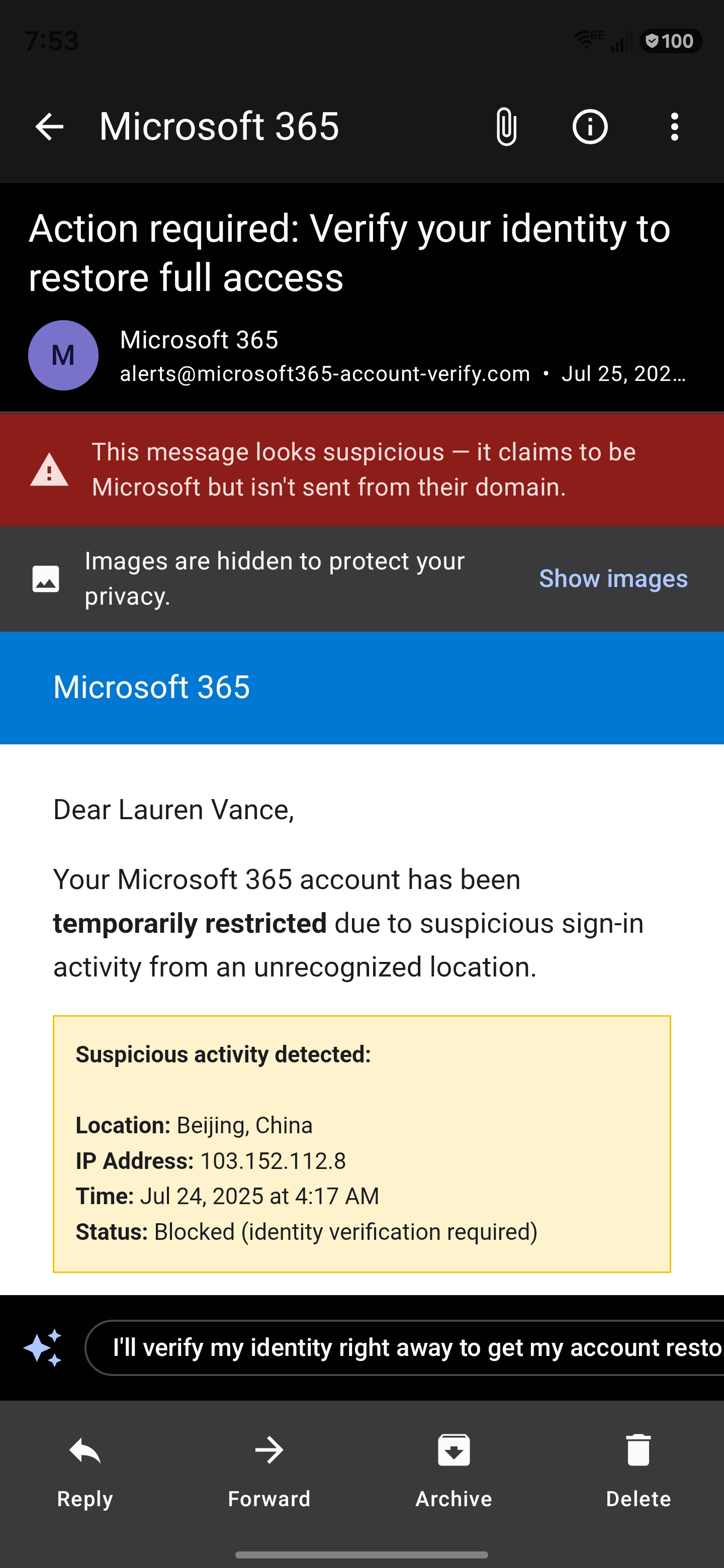
Phishing signals that name what they sawPremium
On-device heuristics read the sender, the registrable domain and the language — in all ten shipped languages — and say plainly when a message claims to be one company but came from elsewhere. The verified-sender (SPF/DKIM) strip and the blocked-tracker count are free; the phishing and scam warnings are part of Mailie Mind.
It learns your spam, and your contactsPremium
Mail you file as junk builds an on-device profile of what junk looks like to you, so a borderline message can say “this resembles mail you’ve marked as spam”. Separately, a deliberately conservative check notices when a known contact’s mail stops resembling anything they have ever written — the one signal that survives an account takeover.
Attachment safety scan
A metadata-level check flags executables, macro documents, archives and double-extension disguises before you open them — and describes itself honestly as a metadata check, not a virus scan, so you know exactly what it did and did not verify.
Outbound
Checks before you sendPremium
In the moment before dispatch: you mentioned an attachment and didn’t add one, exactly one recipient sits outside everyone else’s domain, or this draft is unlike anything you have discussed with this person. Advisory, asked once, and “send anyway” is always available.
On device
Biometric app lock
Lock the app behind biometrics. While it is locked, notifications collapse to a content-free count and the widget hides its recap — so no sender, subject or snippet reaches the lock screen, the notification shade, the recents view or your home screen.
Protocols & accounts
Four protocols, modern and legacy servers, unified behind one protocol-agnostic app.
JMAP, built from spec
A native JMAP client (RFC 8620 / 8621) over HTTPS with EventSource push — the modern, efficient successor to IMAP, implemented from the specification rather than wrapped around someone else’s library.
IMAP with IDLE push
Full IMAP over implicit TLS with real-time IDLE push, CONDSTORE flag deltas where the server offers them, and a window reconcile so a message read or deleted on another device stays in step here.
POP3, hardened
POP3 over implicit TLS 1.3 with authenticated submission, for servers that still need it. Message identity is verified at setup rather than assumed, so a server that cannot supply stable ids is refused with a reason instead of silently duplicating your mail forever. Its inherent limits are stated honestly rather than hidden.
Modern Microsoft accounts
Personal Outlook.com mailboxes ship with IMAP switched off, so Mailie Pro signs in with OAuth and syncs over Microsoft’s modern mail API instead — no password to store, and the same hardened transport, encryption and end-to-end guarantees as every other protocol.
OAuth, on your own transport
Google and Microsoft accounts sign in with OAuth 2.0 and PKCE, carried over the app’s own hardened TLS 1.3 stack rather than a third-party SDK. Providers such as Fastmail, iCloud, Yahoo, Zoho and Yandex use an app password, held sealed in the Android Keystore.
Push without Google
Battery-friendly real-time push for JMAP accounts with no Google messaging service involved — point Mailie Pro at your own UnifiedPush distributor such as ntfy and get instant mail on a de-Googled device. IMAP keeps a live IDLE connection, and a Doze-proof alarm backstops both.
Automatic setup
Autoconfiguration discovery finds your server settings for both IMAP and JMAP from nothing but your email address — probing the standard well-known endpoints — and lets you configure everything by hand when you’d rather.
Built for big screens too
On a tablet or an unfolded foldable the app becomes a navigation rail, a message list and a detail pane — and the detail pane rests on your briefing, so it’s the first thing you see and the thing you return to.
Works offline, honestly
Archive, star, read and delete taken with no signal are queued and applied when you reconnect, rather than silently lost. A send that permanently fails surfaces with the real reason and a retry — never a message you believe was sent but never left.
Found something? Tell us.
If you believe you have found a vulnerability in the Mailie Pro app or in this website, please report it privately to help@mailie.pro — or through the contact form — before disclosing it publicly. Include enough detail to reproduce it. We will acknowledge your report, keep you updated while we work on a fix, and credit you if you would like to be credited. We will not pursue legal action against researchers who report in good faith and give us reasonable time to respond.
Get Mailie Pro on Google Play
Free to download. Every feature unlocked for 7 days — no card, nothing to cancel.
Point your Android camera here to install
GET IT ONGoogle Play