
Every capability, in detail.
From a briefing that shows its reasoning to OpenPGP, S/MIME and modern protocols — the full picture of what Mailie Pro does, and how it protects you while doing it.
Calm to look at. Serious underneath.
Every image below is the real app on a real phone — light and dark, accessible on every screen.



A free, secure email client — and Mailie Mind when you want it.
Everything on this page is built into the app. The capabilities marked Premium are part of a Mailie Pro subscription — free for your first 7 days, then monthly or annual. Everything else is free for as long as you like.
Mailie Mind — on-device intelligence
A language model that runs in the app’s own isolated process, on your hardware. Nothing is ever sent to a server — not your mail, not your prompts, not what it learns about you. Free for 7 days, then part of a subscription; search and find-similar by meaning stay free.
Mailie Mind AdvancedPremium
The generative engine: an instruction-tuned language model of 0.5 or 1.5 billion parameters, whichever suits your phone, running entirely on your hardware with no cloud and no Google Play services required. The models are open-weight and published under their own licences, which are listed in the app under About ▸ Open-source licences. Where your device offers a dedicated neural accelerator, Mailie Mind can use that instead.
The briefingPremium
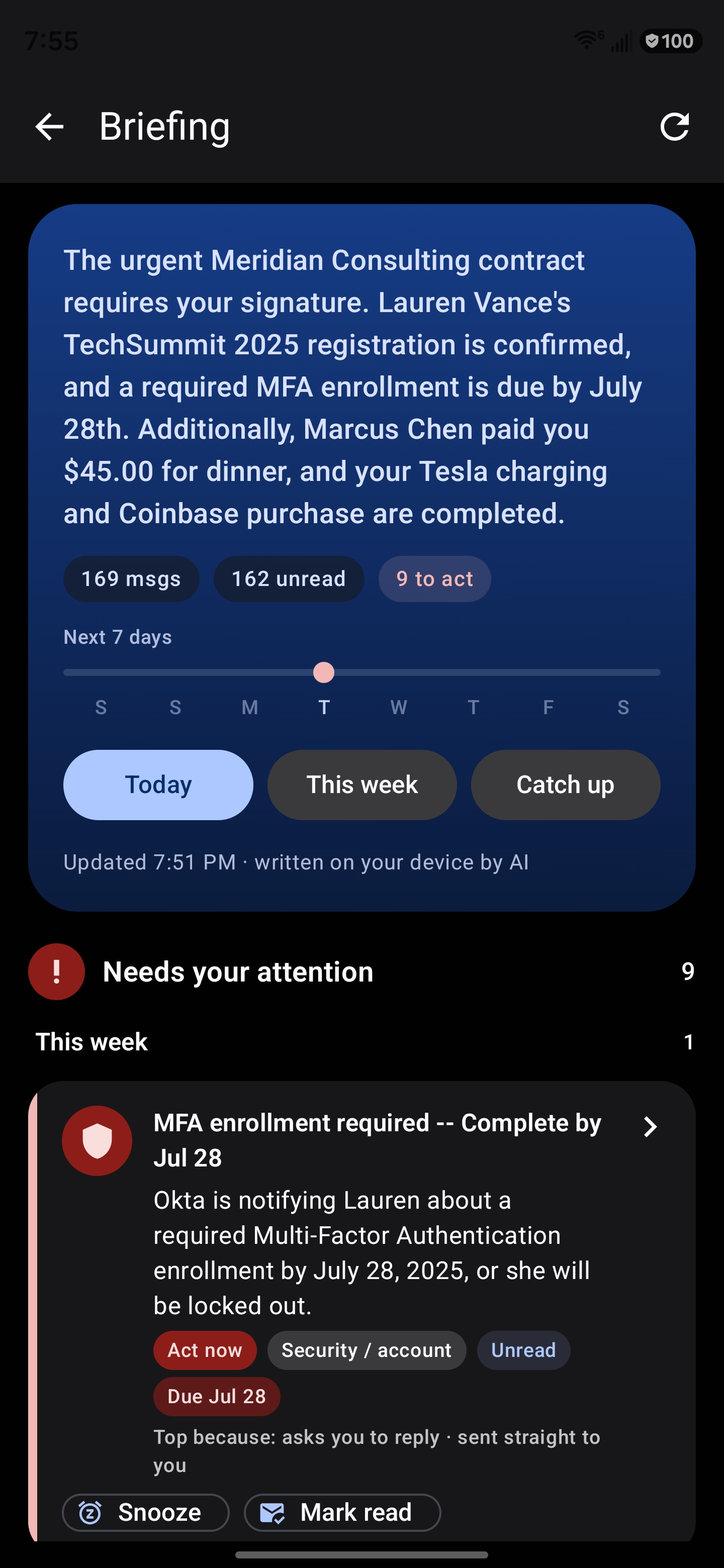
Your day opens with an executive overview, then every conversation triaged into clear lanes: what needs you, what you promised, what you’re waiting on, what’s coming up, what’s merely FYI, and what’s just marketing. Each line is grounded in real mail, with tap-to-source links and one-tap actions.
It tells you whyPremiumNew
Every briefing card can explain its own placement — “asks you to reply · sent straight to you · due tomorrow”. The reasons are read out of the ranking arithmetic itself rather than written alongside it, so the explanation cannot drift from the decision it describes.
Deadlines, not just rankingsPremiumNew
The attention lane groups by when things are actually due — overdue, today, this week, undated — and a seven-day rail marks every extracted deadline and event. Dates are parsed out of the mail itself; nothing is invented.
What you said you’d doPremiumNew
Mailie Pro reads your own sent mail for promises you made — “I’ll send the numbers tomorrow” — and surfaces the ones that have gone quiet past their date. The sentence is quoted verbatim from your message, never paraphrased, so it can never accuse you of something you didn’t write.
While you were awayPremiumNew
A third briefing window bounded by when you last looked rather than by the calendar. Come back from a week off and you get what changed since you left, ranked on a scale that fits the gap — so a fortnight of mail doesn’t collapse into “yesterday”.
Ask your inboxPremium
Ask in plain language — “how much is the invoice due?”, “what did the lawyer send?” — and Mailie Mind retrieves the relevant messages and answers from them, with a numbered source chip on every line so you can tap straight to the email. Follow-up questions remember what you just asked about.
Understands meaning, in any language
Mailie Mind Index turns every cached message into a 256-dimension vector using a 300-million-parameter multilingual embedding model, so search, find-similar and ask-your-inbox work by meaning rather than keywords — across 100+ languages including Arabic. It installs itself quietly in the background, and search and find-similar are free forever.
Categories, in the inbox itselfPremium
Your mail sorts itself on-device into nine categories — action required, meetings, finance, orders, security, social, personal, updates and newsletters — as a filter strip on the inbox, not a separate screen you have to remember to visit. Correct a category once and it stays corrected: permanently for that message, generalised to that sender, and kept as a training signal. A message never re-files itself under your finger while you are acting on it.
Summaries where you arePremium
Tap the spark beside any message and a summary streams in right there in the list, without opening the mail. Frequently-read messages are pre-summarised in the background while the phone charges, so the common case is instant.
Find similar
From any message, surface every related email across all your folders and accounts by meaning — a lease clause filed in Archive, every invoice from one vendor — ranked by how closely they match, and honest about it when it falls back to keyword ranking.
Mute similar mail
Tired of a certain kind of message? Mute it, and future mail that means the same thing is quietly archived. You see a live preview of exactly what the rule would catch, at three sensitivities, before you commit to it.
Smart filtersNew
Turn one example message into a filing rule that works by meaning rather than by sender — archive it, junk it or star it. Because a junk filter can lose real mail, it shows you what it would catch and asks you to confirm before it is created.
Priority topic alerts
Name the topics that matter — “contract to sign”, “server outage”, in any language — and get a high-priority notification when mail about them arrives, matched by meaning on your device. You see what a topic would have caught while you’re still typing it.
Replies in your own voicePremium
Reply suggestions are built from the mail you have actually sent — your greeting, your sign-off, your typical length — and from your past replies to similar messages. They sound like you rather than like a template, and they are always yours to edit before sending.
Compose & rewritePremium
Draft a whole email from a one-line brief, or rewrite what you have — improve, shorten, formalise, warm up, or proofread. Composition borrows your writing voice; rewriting deliberately does not, because the text you already wrote is your voice at full fidelity.
Live, word by wordPremium
Summaries, answers and drafts stream in as the model writes them on the phone, so you read along instead of watching a spinner. Nothing about the process leaves the device.
Grounded, and checked twicePremiumNew
Generated text is verified before you ever see it: every fact — dates, amounts, names, links — must appear literally in the source message, and the whole summary is checked for staying on topic. Anything that fails falls back to Mailie Mind Basic, an extractive engine that can only quote what is already in the mail and so structurally cannot invent anything.
On-device translationPremium
Translate messages with downloadable language packs. Only the generic language pack is fetched; the text of your mail never leaves the device.
Acceleration that configures itself
Mailie Mind compiles more than one compute back-end and picks whichever your phone can actually run, falling back to the processor on its own if a graphics driver misbehaves — and remembering the fault, so it never repeats it. There is nothing to configure.
An honest diagnostics panelNew
See exactly what your phone is using: processor, memory, CPU instruction sets, the live acceleration path, which engine will answer you, how many messages are indexed, and a speed test that measures the engine you actually selected. Every number is measured, never estimated.
Heavy work happens on the chargerNew
Indexing, category refinement and summary pre-computation run while the phone is charging, with a thermal brake that backs off when the device gets warm — so the app feels instant in the morning and costs you nothing during the day.
Security & encryption
Hardened at every layer, with your data sovereignty as the first principle rather than a marketing line. Every guarantee below applies on the free tier.
TLS 1.3 only
Every incoming and outgoing connection is implicit TLS 1.3 with certificate pinning. STARTTLS and cleartext are not merely switched off — no code path for them exists anywhere in the app, so a downgrade attack has nothing to downgrade to.
Connection-tampering alerts
Mailie Pro learns and pins the SHA-256 fingerprint of your server’s public key on first connect, and tracks issuer continuity. If that identity changes, the app stops, warns you, and refuses to reconnect until you choose to trust the new one — a clear signal of possible interception.
Encrypted DNS, fail-closed
Server names resolve over DNS-over-HTTPS, bootstrapped from an IP address so it needs no plaintext lookup even to start. Choose from several resolvers or supply your own. If encrypted DNS cannot be established the connection is refused rather than leaking a cleartext query.
SOCKS5 / onion routing
Route every connection through a SOCKS5 proxy such as Tor via Orbot — including the encrypted-DNS lookups themselves. Every transport is bound to the proxy, so an unreachable proxy fails the connection instead of quietly bypassing it, and toggling it takes effect immediately rather than at the next restart.
Encrypted local store
All cached mail, contacts, briefings and search vectors live in a SQLCipher (AES-256) encrypted database — encrypted page by page on disk, not merely guarded by file permissions. Nothing readable is written to storage.
Hardware-backed keys
Encryption keys live in the Android hardware keystore, using StrongBox where the device provides it. Server passwords and tokens are sealed with an AES-256-GCM key and never stored in plaintext.
OpenPGP end-to-end
PGP/MIME encryption and signing with Autocrypt key exchange, built on PGPainless and Bouncy Castle rather than hand-rolled crypto. Secret keys are double-sealed — a passphrase-protected key ring whose passphrase is itself Keystore-sealed — and decrypted plaintext exists only in memory; the cache keeps the ciphertext.
Automatic key discovery
Write to someone and Mailie Pro quietly looks up their published OpenPGP key in their domain’s Web Key Directory, enabling end-to-end encryption with no manual key exchange.
S/MIME (X.509)New
Send and read S/MIME encrypted and signed mail alongside OpenPGP, on every protocol. Import your certificate from a PKCS#12 file; the private key is Keystore-sealed and the passphrase is used once and never stored. The composer picks the right scheme for your recipients automatically.
Phishing & scam detectionPremium
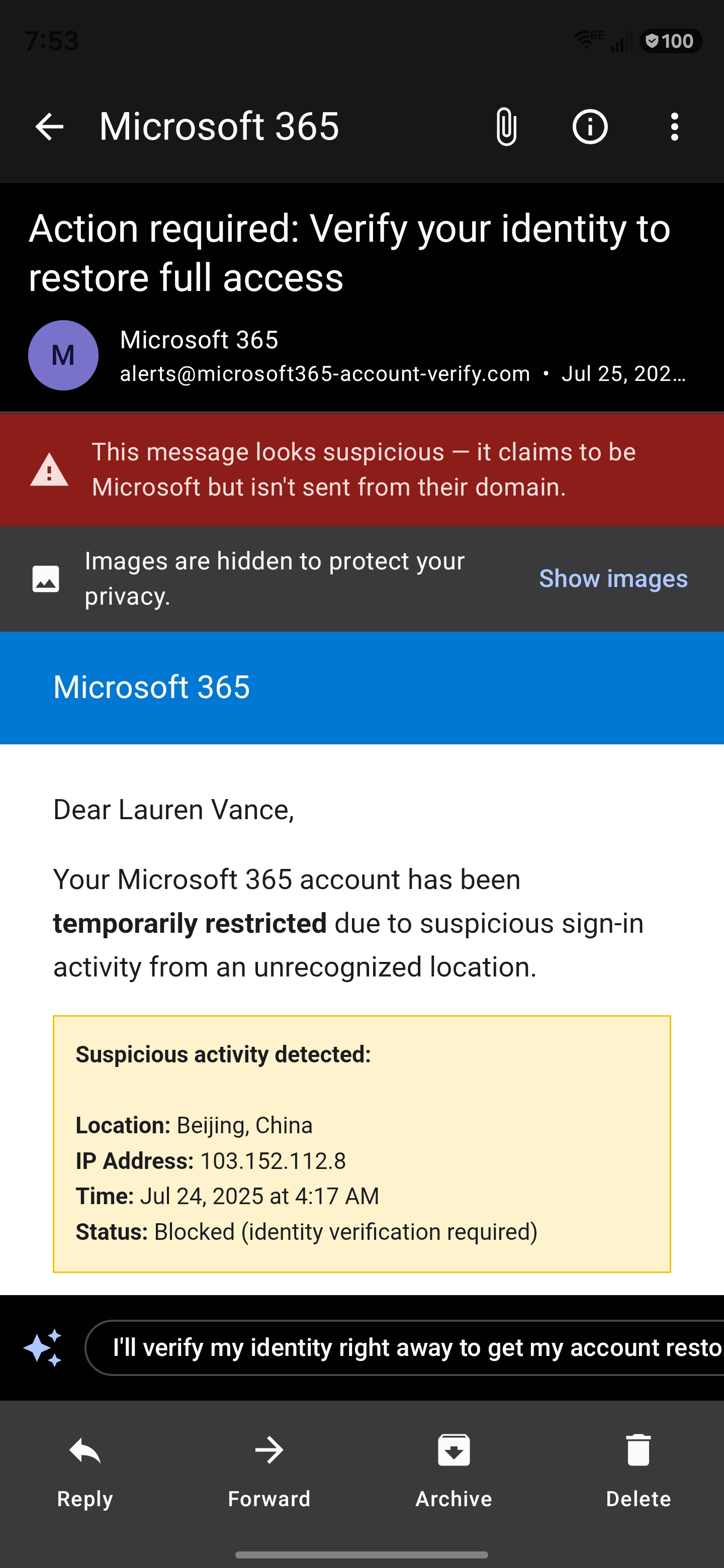
On-device heuristics flag lookalike domains, urgency language and mismatched senders in every shipped language. On a borderline message an optional on-device model check can raise the warning — advisory only, and it never acts on your behalf. The sender-trust strip showing SPF and DKIM results is free.
It learns your spamPremiumNew
Mail you file as junk teaches an on-device profile of what junk looks like to you. A borderline message that resembles it says so — “this resembles mail you’ve marked as spam” — without any model call, and without ever auto-deleting anything.
Compromised-contact warningPremiumNew
The one signal that survives an account takeover: the address is genuine and the signatures pass, but the message doesn’t resemble anything that person has ever written to you. Deliberately the most conservative check in the app, and always advisory.
Checks before you sendPremiumNew
A quiet review in the moment before dispatch: you mentioned an attachment and didn’t add one, exactly one recipient sits outside everyone else’s domain, or this draft is unlike anything you’ve discussed with this person. Advisory, asked once per draft, and never a wall.
Attachment safety scan
A metadata-level check flags executables, macro documents, archives and double-extension disguises before you open them — and says plainly that it is a metadata check, not a virus scan, so you know exactly what it did and did not verify.
Tracker defence
Remote images are blocked by default and tracking pixels are filtered, so a sender cannot tell whether — or when — you opened their message. Nothing is proxied through a third party, because that would only move the leak somewhere else.
Biometric app lock
Lock the app behind biometrics. While locked, notifications collapse to a content-free count and the widget hides its recap, so nothing readable reaches the lock screen, the notification shade, the recents view or your home screen.
Encrypted backup & restore
Export your accounts to a file encrypted with AES-256-GCM under a PBKDF2-HMAC-SHA256 key derived from your passphrase — which never leaves the device and is never stored. Restore is available from Settings and from first-run setup.
Protocols & accounts
Four protocols, modern and legacy servers, unified behind one protocol-agnostic app.
JMAP, built from spec
A native JMAP client (RFC 8620 / 8621) over HTTPS with EventSource push — the modern, efficient successor to IMAP, implemented from the specification rather than wrapped around someone else’s library.
IMAP with IDLE push
Full IMAP over implicit TLS with real-time IDLE push, CONDSTORE flag deltas where the server offers them, and a window reconcile so a message read or deleted on another device stays in step here.
POP3, hardened
POP3 over implicit TLS 1.3 with authenticated submission, for servers that still need it. Message identity is verified at setup rather than assumed, so a server that cannot supply stable ids is refused with a reason instead of silently duplicating your mail forever. Its inherent limits are stated honestly rather than hidden.
Modern Microsoft accounts
Personal Outlook.com mailboxes ship with IMAP switched off, so Mailie Pro signs in with OAuth and syncs over Microsoft’s modern mail API instead — no password to store, and the same hardened transport, encryption and end-to-end guarantees as every other protocol.
OAuth, on your own transport
Google and Microsoft accounts sign in with OAuth 2.0 and PKCE, carried over the app’s own hardened TLS 1.3 stack rather than a third-party SDK. Providers such as Fastmail, iCloud, Yahoo, Zoho and Yandex use an app password, held sealed in the Android Keystore.
Push without Google
Battery-friendly real-time push for JMAP accounts with no Google messaging service involved — point Mailie Pro at your own UnifiedPush distributor such as ntfy and get instant mail on a de-Googled device. IMAP keeps a live IDLE connection, and a Doze-proof alarm backstops both.
Automatic setup
Autoconfiguration discovery finds your server settings for both IMAP and JMAP from nothing but your email address — probing the standard well-known endpoints — and lets you configure everything by hand when you’d rather.
Built for big screens tooNew
On a tablet or an unfolded foldable the app becomes a navigation rail, a message list and a detail pane — and the detail pane rests on your briefing, so it’s the first thing you see and the thing you return to.
Works offline, honestlyNew
Archive, star, read and delete taken with no signal are queued and applied when you reconnect, rather than silently lost. A send that permanently fails surfaces with the real reason and a retry — never a message you believe was sent but never left.
Everyday productivity
The fast, thoughtful inbox flow you actually want, with a few things no other client does.
The file drawerPremiumNew
Every attachment you have ever received, as files — searchable by name, sender or subject, filtered by type, newest first. Save one to your device, run text recognition on it, security-scan it, or jump to the message it arrived in. It indexes your existing mail in the background, and tells you while it is still working.
PeopleNew
One page per person, whether you saved them or simply exchanged mail with them: everything they have sent you across every folder and account, whether you hold a key for them, and one-tap unsubscribe, block or unblock. Every name rendered anywhere in the app is a door to it.
Contacts, on your termsNew
A real address book stored in the encrypted database — no contacts permission, and no access to your phone’s address book. Import and export vCards, and optionally sync over CardDAV to your own provider, with discovery locked to your account’s own domain so your password can never be sent somewhere else.
Search that admits its limitsNew
A full-text index makes search fast without decrypting your whole mailbox, and it still finds matches inside words. When there are more results than it showed you, it says so — instead of quietly handing you an arbitrary slice.
Conversation view
Replies group into one threaded conversation. When a server provides no threading at all — POP3 always, IMAP when subjects drift — Mailie Pro derives it on-device, and a conversation you have already seen never rearranges itself.
Snooze — including “until they reply”New
Hide a message until later, or until the conversation actually moves. A reply-snooze has no timer: it is released by the reply landing, which is the snooze a follow-up really needs and one no clock can express.
Calendar invitations & RSVP
Invitations show an inline card. Accept, Tentative or Decline sends a proper reply to the organiser, and one tap adds the event to your calendar.
One-click unsubscribe
Where a sender supports it, leave a mailing list with a single in-app tap and no browser detour — and the app tells you honestly whether it was a verified one-click unsubscribe or just a link it opened.
Masked email aliases
Generate burner addresses through a masked-alias provider such as SimpleLogin or addy.io, so a signup never learns your real address. You supply the account and the token; nothing is routed through us.
Scan a documentNew
Photograph a document from the composer: edges and perspective are corrected, it attaches as a PDF, and the recognised text is offered for insertion into your message. It needs no camera permission at all, and the button is simply absent on devices that can’t do it.
Handwrite or dictateNew
Write with a finger or stylus, or dictate, straight into the message body — both alternatives to the keyboard rather than replacements for it. Handwriting recognition runs in the app’s own process, so your ink is never uploaded, and it covers every language the app ships in.
Real-time notifications
New mail alerts arrive the instant a message lands on your server — with Reply, Snooze, Archive and Delete on the notification itself, and the newest message always at the top of the shade.
Reply reminders
A daily nudge for threads where you sent the last message and are still waiting. Grounded in your actual sent mail — never guessed.
Per-account colours & sounds
Each account gets its own accent colour throughout the app and its own notification channel, so you know which mailbox a message belongs to — and who it’s from — before you look.
Configurable swipes
Map left and right swipes to Archive, Delete, Snooze, Star or Read. Dismissing unread mail from a sender is also a quiet signal the classifier uses — carefully bounded, so ordinary triage teaches it nothing wrong.
Scheduled send & undo send
Send later from a device-local outbox — nothing is staged on anyone’s server — and a short grace period to catch the message you shouldn’t have sent.
Rules & filters
Auto-apply mark-read, star, archive, move or delete to newly arrived mail, alongside the meaning-based smart filters.
Signatures & templates
Reusable signatures and message templates for faster, consistent replies.
Load your whole mailbox
Choose how much each sync fetches and page back through years of mail. Already-downloaded messages are never thrown away to save space — the cache only grows.
Home-screen widget
Your unread count, always a glance away — and, with a subscription, your latest briefing above it, refreshing as new briefings are generated. It collapses to the count alone while the app is locked.
Designed for everyone
Ten languages, and accessibility treated as a written contract rather than a checkbox.
Accessibility, screen by screen
Every screen has a written screen-reader contract: headings you can jump between, descriptive labels on every control, deliberate focus order, and announcements that fire once rather than stealing focus. Row actions are all reachable without gestures.
Read aloud & voice input
Have messages and answers read aloud, and dictate replies by voice — both on-device and opt-in. There is also a reduce-motion setting and an in-app text size that works without changing your system settings.
Ten languages, properlyNew
English, Arabic, Spanish, Portuguese, French, German, Italian, Russian, Hindi and Turkish — with the intelligence localised too, not just the buttons. Date formats, plural rules and the classifier’s own vocabulary follow the language you chose.
Right-to-left, done rightNew
Arabic mirrors the entire layout, and the on-device search, classification and briefing understand Arabic text rather than falling back to English behaviour.
Android’s current design language
Generous rounding, springy motion and flat surfaces, with a brand accent that holds its hue in both light and dark rather than swapping.
Light, dark & AMOLED
Follows the system theme with a manual override, plus a true-black mode that saves real battery on an OLED panel.
Where the app draws its own limits
Mailie Pro would rather tell you what it can’t do than pretend otherwise. Text recognition can’t read Arabic or Cyrillic script yet, and says so instead of returning nonsense. Document scanning needs Google Play services, so on a de-Googled phone the button is simply absent rather than dead. POP3 has no folders and no push, and the app states that plainly instead of faking it. And every AI answer carries the same note: it’s a draft to check against the original, not advice to act on.
Get Mailie Pro on Google Play
Free to download. Every feature unlocked for 7 days — no card, nothing to cancel.
Point your Android camera here to install
GET IT ONGoogle Play